GOS Forms
What are the top tips for avoiding signature issues on GOS claim forms?
The following steps can help reduce avoidable signature problems:
- Wait for the signature confirmation message before continuing.
- Save the claim as soon as signatures are captured.
- Do not leave signature windows open unnecessarily.
- Remember that QR code signature windows expire after three minutes.
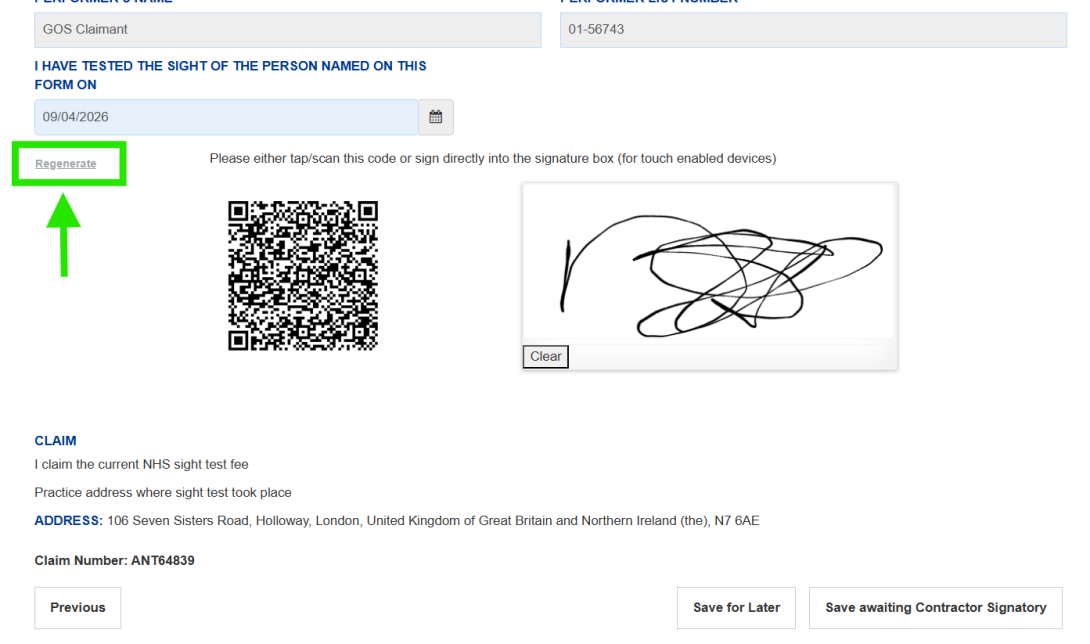
- Use Regenerate if a signature window times out.
- Recheck signatures if key patient details are amended after signing.
Can a contractor sign multiple claims at once?
Yes. Users with the Contractor Signatory role can review and sign multiple GOS claims together where the claims are complete and ready for submission. This is known as bulk signing.
From the Ophthalmic Payments dashboard, select ‘Claim submission’ and choose your claim type, for example GOS6. You will then see a list of claims that are complete and ready for submission.
Step by step guidance for GOS1, GOS5 and GOS6 claims, including screenshots, is available in the user guides on the Ophthalmic Payments resources page on the PCSE website.
Which signatures may be required on GOS claims?
Depending on the claim type and workflow, a GOS claim may require a patient signature, performer signature and contractor signature*. All required signatures must be completed before the claim can proceed through the submission process.
*Note: The Performer and the Contractor Signatory may be the same individual, however two signatures are required.
Why can I not move to the next stage after signing a draft claim form?
The system will display an error message in red next to the section that needs attention, the message will advise of the reason why you can't move to the next stage.
You can also check for the following:
- the signature has been submitted successfully
- that the confirmation message has appeared
- the signature window has not timed out
If the window has expired, regenerate it and complete the signature again.
Why does the system keep asking for another patient signature on a GOS claim form?
The system may require a new patient signature if information affecting the patient declaration has changed after the original signature was captured. Examples include changes to patient eligibility, benefit entitlement or medical condition information.
If I make changes to a signed draft claim, will I need another signature?
If changes are made to certain parts of a draft claim after a signature has been captured, the relevant signature may need to be captured again before the claim can be saved or submitted. Examples include changes to patient eligibility, benefit entitlement or medical condition details.
This will need to be signed again by the patient and performer/contractor before the claim can be submitted.
Can I save a GOS claim and return to it later?
Yes. If you need to leave a claim unfinished, capture the patient signature, wait for the confirmation message, and then select Save for Later.
What should I do after capturing a signature on a GOS claim form?
Save the claim as soon as possible after the confirmation message appears. This helps ensure the signature is retained and reduces the risk of having to capture it again.
How do I know a GOS claim signature has been captured successfully?
After the signature has been submitted, wait for the confirmation message to appear before moving on to the next stage of the claim. This confirms the signature has been recorded in the system.
Why has the signature QR code timed out when submitting a GOS claim?
When using the QR code option for patient, performer or contractor signatures, the signature browser window expires after three minutes. It may also time out if the signature has not been saved or the signature window is left inactive.
Why has my signature disappeared from a GOS claim?
If changes are made to certain parts of a draft claim after a signature has been captured, the relevant signature may need to be captured again before the claim can be saved or submitted. Examples include changes to patient eligibility, benefit entitlement or medical condition details.