Statements
How long are statements available on PCSE Online?
You can view historic statements in PCSE Online for up to seven years, including the current year.
When searching for statements, you can select a maximum date range of three months at a time. If you choose a date range greater than three months, an error message will be displayed. To view older statements, search in separate three-month periods.
How do I raise a query about my ophthalmic payment statement?
If you have reviewed your statement and still need support, you should submit a case via the Ophthalmic Payments contact us page and selecting ‘New Ophthalmic Payments enquiry’.
If you are following up on an existing case, select selecting ‘Existing Ophthalmic Payments enquiry’ and include your case reference where available, which will start CAS-XXXXXX-XXXXXXX.
What details should I include when raising a ophthalmic payment statement query?
If you experience any issues in PCSE Online, please let us know by submitting a case via the Ophthalmic Payments contact us page and selecting ‘New Ophthalmic Payments enquiry’.
To help PCSE investigate, include the payment period, organisation details, the claim ID for the item you are querying, and any supporting information that explains what you expected to see.
Why might a claim be missing from my ophthalmic payment statement?
A claim may not appear on the statement if it was not included in the relevant payment run, if it needs further action, or if it will be processed in a later payment cycle. Check the claim status and payment period before raising an enquiry.
Do statements include all of my ophthalmic claims?
Statements reflect claims that have been received, accepted and processed within the relevant payment cycle. Claims submitted close to a cut-off, or claims requiring further action, may not appear on the statement you are currently reviewing.
I can open the ophthalmic payment statement, but it does not look complete. What should I try first?
Download the statement again and select the expanded version if the option appears. Also check that your browser or PDF viewer is displaying the full document and that you are not viewing a cropped or preview-only version.
If you still have problems, downloading the file as a CSV is another option.
Why can I not see all the information when I download my ophthalmic payment statement?
When downloading your selected statement, choose the expanded version if prompted. This helps ensure that all available statement data is included when you download or print the statement.
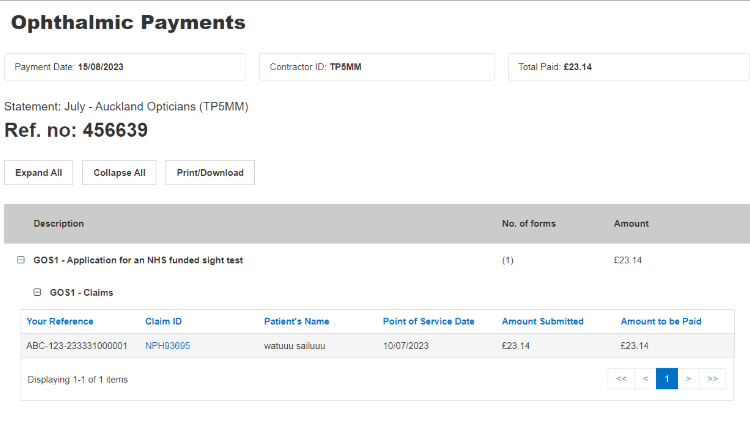
My payment amount is different from what I expected. What should I do
Review your statement alongside the claims you submitted. Common queries include missing individual claims, missing multiple claims, missing payments, and differences between expected and actual payment values. If you still believe there is an issue after checking the statement, please let us know by submitting a case via the Ophthalmic Payments contact us page and selecting ‘New Ophthalmic Payments enquiry’.
What should I check before raising a payment query?
Before contacting PCSE, review the statement carefully and check:
- The payment period shown on the statement.
- Whether the claim was submitted successfully.
- Whether the claim may be included in a different payment cycle.
- Any adjustments or payment information shown for that period.
- That you are looking at the correct organisation account.
Why have I received a notification that my ophthalmic payment statement is available?
A notification is issued when the payment run for your area has been completed and your statement is available to view in PCSE Online.
What permissions do I need to view ophthalmic payment statements?
Your PCSE Online role must include statement viewing access for your organisation. If you cannot see statements, your organisation administrator may need to check your user access and role permissions.
The OPHStatementView role must be assigned to users who need access to contractual ophthalmic payment statements in PCSE Online.
Why can I not see an ophthalmic payment statement?
There may be a few reasons why a statement is not visible. Check that you are signed into the correct organisation account, that the statement for the relevant payment period has been released, and that your PCSE Online user role gives you access to view statements.
I submit claims through a PMS provider. Can I still view my statement in PCSE Online?
Yes. Monthly statements are accessed through PCSE Online, including where claims are submitted through a PMS provider.
Where can I access my ophthalmic payment statement?
You can access ophthalmic payment statements through PCSE Online. This applies whether you submit claims directly through PCSE Online or through a Practice Management System, often referred to as a PMS provider.
What is my ophthalmic payment statement?
Your ophthalmic payment statement provides a summary of the claims and payments processed for your organisation during the relevant payment period. It is available through PCSE Online and can be used to review payment information.